Instructions to use nvidia/EGM-8B with libraries, inference providers, notebooks, and local apps. Follow these links to get started.
- Libraries
- Transformers
How to use nvidia/EGM-8B with Transformers:
# Use a pipeline as a high-level helper from transformers import pipeline pipe = pipeline("image-text-to-text", model="nvidia/EGM-8B") messages = [ { "role": "user", "content": [ {"type": "image", "url": "https://huggingface.co/datasets/huggingface/documentation-images/resolve/main/p-blog/candy.JPG"}, {"type": "text", "text": "What animal is on the candy?"} ] }, ] pipe(text=messages)# Load model directly from transformers import AutoProcessor, AutoModelForImageTextToText processor = AutoProcessor.from_pretrained("nvidia/EGM-8B") model = AutoModelForImageTextToText.from_pretrained("nvidia/EGM-8B") messages = [ { "role": "user", "content": [ {"type": "image", "url": "https://huggingface.co/datasets/huggingface/documentation-images/resolve/main/p-blog/candy.JPG"}, {"type": "text", "text": "What animal is on the candy?"} ] }, ] inputs = processor.apply_chat_template( messages, add_generation_prompt=True, tokenize=True, return_dict=True, return_tensors="pt", ).to(model.device) outputs = model.generate(**inputs, max_new_tokens=40) print(processor.decode(outputs[0][inputs["input_ids"].shape[-1]:])) - Notebooks
- Google Colab
- Kaggle
- Local Apps
- vLLM
How to use nvidia/EGM-8B with vLLM:
Install from pip and serve model
# Install vLLM from pip: pip install vllm # Start the vLLM server: vllm serve "nvidia/EGM-8B" # Call the server using curl (OpenAI-compatible API): curl -X POST "http://localhost:8000/v1/chat/completions" \ -H "Content-Type: application/json" \ --data '{ "model": "nvidia/EGM-8B", "messages": [ { "role": "user", "content": [ { "type": "text", "text": "Describe this image in one sentence." }, { "type": "image_url", "image_url": { "url": "https://cdn.britannica.com/61/93061-050-99147DCE/Statue-of-Liberty-Island-New-York-Bay.jpg" } } ] } ] }'Use Docker
docker model run hf.co/nvidia/EGM-8B
- SGLang
How to use nvidia/EGM-8B with SGLang:
Install from pip and serve model
# Install SGLang from pip: pip install sglang # Start the SGLang server: python3 -m sglang.launch_server \ --model-path "nvidia/EGM-8B" \ --host 0.0.0.0 \ --port 30000 # Call the server using curl (OpenAI-compatible API): curl -X POST "http://localhost:30000/v1/chat/completions" \ -H "Content-Type: application/json" \ --data '{ "model": "nvidia/EGM-8B", "messages": [ { "role": "user", "content": [ { "type": "text", "text": "Describe this image in one sentence." }, { "type": "image_url", "image_url": { "url": "https://cdn.britannica.com/61/93061-050-99147DCE/Statue-of-Liberty-Island-New-York-Bay.jpg" } } ] } ] }'Use Docker images
docker run --gpus all \ --shm-size 32g \ -p 30000:30000 \ -v ~/.cache/huggingface:/root/.cache/huggingface \ --env "HF_TOKEN=<secret>" \ --ipc=host \ lmsysorg/sglang:latest \ python3 -m sglang.launch_server \ --model-path "nvidia/EGM-8B" \ --host 0.0.0.0 \ --port 30000 # Call the server using curl (OpenAI-compatible API): curl -X POST "http://localhost:30000/v1/chat/completions" \ -H "Content-Type: application/json" \ --data '{ "model": "nvidia/EGM-8B", "messages": [ { "role": "user", "content": [ { "type": "text", "text": "Describe this image in one sentence." }, { "type": "image_url", "image_url": { "url": "https://cdn.britannica.com/61/93061-050-99147DCE/Statue-of-Liberty-Island-New-York-Bay.jpg" } } ] } ] }' - Docker Model Runner
How to use nvidia/EGM-8B with Docker Model Runner:
docker model run hf.co/nvidia/EGM-8B
EGM-Qwen3-VL-8B
Model Summary
EGM-Qwen3-VL-8B is the flagship model of the EGM (Efficient Visual Grounding Language Models) family. It is built on top of Qwen3-VL-8B-Thinking and trained with a two-stage pipeline: supervised fine-tuning (SFT) followed by reinforcement learning (RL) using GRPO (Group Relative Policy Optimization).
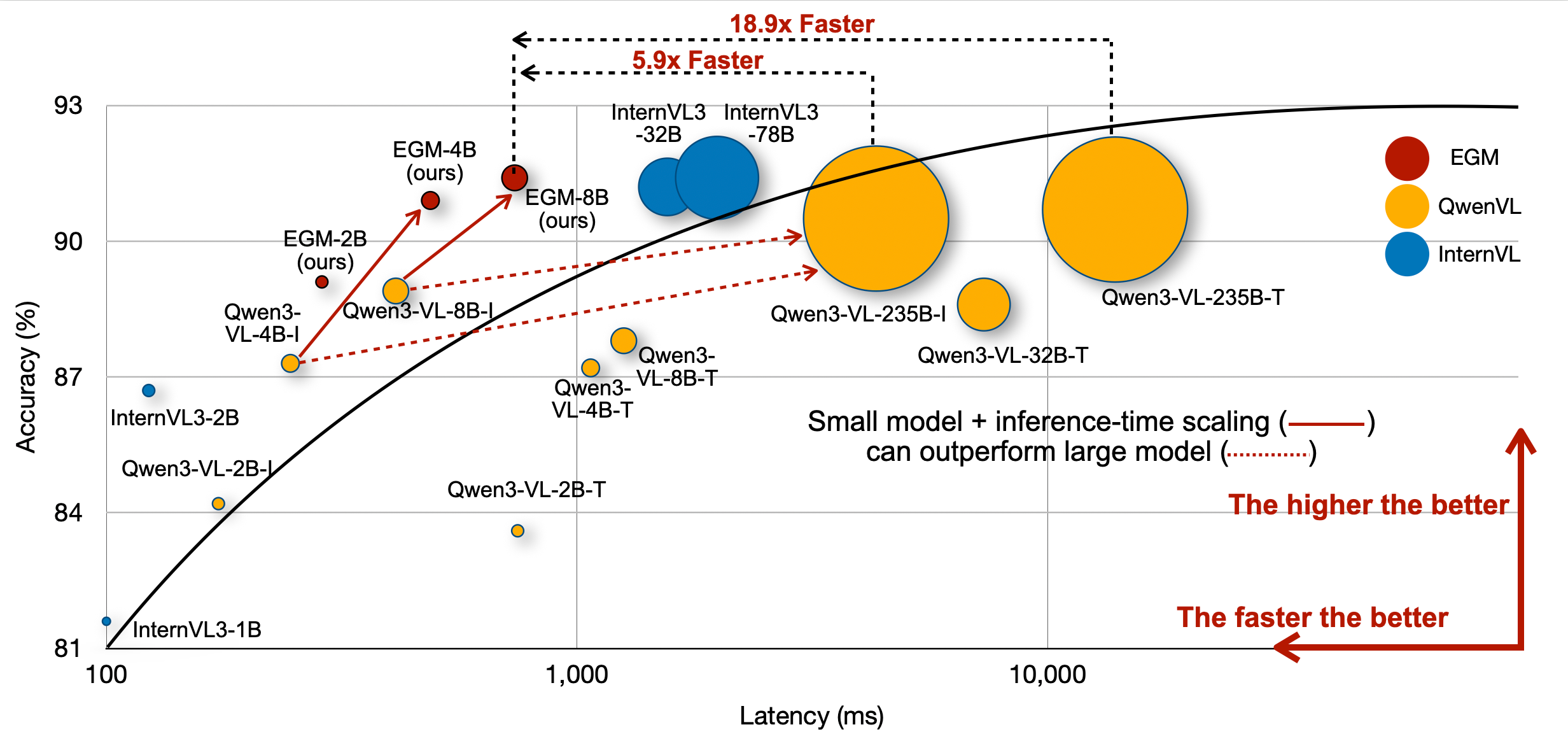
EGM demonstrates that by increasing test-time computation, small vision-language models can outperform much larger models in visual grounding tasks while being significantly faster at inference.
Key Results
- 91.4 average IoU on the RefCOCO benchmark (vs. 87.8 for the base Qwen3-VL-8B-Thinking)
- +3.6 IoU improvement over the base model
- Outperforms Qwen3-VL-235B-A22B-Instruct (88.2 avg IoU) and Qwen3-VL-235B-A22B-Thinking (90.7 avg IoU)
- 5.9x faster inference than Qwen3-VL-235B (737ms vs 4,320ms average latency)
- 18.9x faster than Qwen3-VL-235B-Thinking
RefCOCO Benchmark Results
| Model | RefCOCO val | RefCOCO test-A | RefCOCO test-B | RefCOCO+ val | RefCOCO+ test-A | RefCOCO+ test-B | RefCOCOg val | RefCOCOg test | Avg |
|---|---|---|---|---|---|---|---|---|---|
| Qwen3-VL-8B-Thinking | 91.0 | 92.5 | 86.6 | 86.2 | 91.2 | 80.5 | 87.8 | 88.6 | 87.8 |
| EGM-Qwen3-VL-8B | 93.9 | 95.6 | 91.2 | 90.5 | 93.5 | 86.3 | 90.8 | 91.4 | 91.4 |
| Qwen3-VL-235B-A22B-Instruct | 90.4 | 94.6 | 82.2 | 86.4 | 92.1 | 78.5 | 90.5 | 90.5 | 88.2 |
| Qwen3-VL-235B-A22B-Thinking | 93.4 | 94.1 | 90.6 | 89.5 | 91.4 | 85.2 | 90.4 | 90.5 | 90.7 |
How It Works
VLMs of different sizes often share the same visual encoder. Small models fall behind large models primarily due to a gap in text understanding capabilities — 62.8% of small model errors stem from complex prompts with multiple relational descriptions. EGM mitigates this gap by generating many mid-quality tokens (from small models) to match the performance of large VLMs that produce fewer but more expensive tokens.
Training Pipeline
- SFT Stage: A proprietary VLM generates detailed chain-of-thought reasoning steps for visual grounding training data. The base model is fine-tuned on this data. The SFT checkpoint is available as nvidia/EGM-8B-SFT.
- RL Stage: GRPO is applied with a reward function combining IoU and task success metrics, further improving grounding accuracy.
Quickstart
Download
pip install -U huggingface_hub
huggingface-cli download nvidia/EGM-8B --local-dir ./models/EGM-8B
Inference with SGLang
Launch the server:
pip install "sglang[all]>=0.5.5"
python -m sglang.launch_server \
--model-path nvidia/EGM-8B \
--chat-template=qwen3-vl \
--port 30000
Send a visual grounding request:
import openai
import base64
client = openai.Client(base_url="http://127.0.0.1:30000/v1", api_key="EMPTY")
# Load a local image as base64
with open("example.jpg", "rb") as f:
image_base64 = base64.b64encode(f.read()).decode("utf-8")
response = client.chat.completions.create(
model="nvidia/EGM-8B",
messages=[
{
"role": "user",
"content": [
{"type": "image_url", "image_url": {"url": f"data:image/jpeg;base64,{image_base64}"}},
{"type": "text", "text": "Please provide the bounding box coordinate of the region this sentence describes: the person on the left."},
],
}
],
temperature=0.6,
top_p=0.95,
max_tokens=8192,
)
print(response.choices[0].message.content)
Model Architecture
| Component | Details |
|---|---|
| Architecture | Qwen3VLForConditionalGeneration |
| Text Hidden Size | 4096 |
| Text Layers | 36 |
| Attention Heads | 32 (8 KV heads) |
| Text Intermediate Size | 12,288 |
| Vision Hidden Size | 1152 |
| Vision Layers | 27 |
| Patch Size | 16 x 16 |
| Max Position Embeddings | 262,144 |
| Vocabulary Size | 151,936 |
Citation
@article{zhan2026EGM,
author = {Zhan, Guanqi and Li, Changye and Liu, Zhijian and Lu, Yao and Wu, Yi and Han, Song and Zhu, Ligeng},
title = {EGM: Efficient Visual Grounding Language Models},
booktitle = {arXiv},
year = {2026}
}
Acknowledgment
This repository benefits from Qwen3-VL, InternVL, verl and verl-internvl.
- Downloads last month
- 537
Model tree for nvidia/EGM-8B
Base model
Qwen/Qwen3-VL-8B-Thinking