
Instructions to use mukel/Qwen2.5-Math-7B-Instruct-GGUF with libraries, inference providers, notebooks, and local apps. Follow these links to get started.
- Libraries
- llama-cpp-python
How to use mukel/Qwen2.5-Math-7B-Instruct-GGUF with llama-cpp-python:
# !pip install llama-cpp-python from llama_cpp import Llama llm = Llama.from_pretrained( repo_id="mukel/Qwen2.5-Math-7B-Instruct-GGUF", filename="Qwen2.5-Math-7B-Instruct-Q4_0.gguf", )
llm.create_chat_completion( messages = [ { "role": "user", "content": "What is the capital of France?" } ] ) - Notebooks
- Google Colab
- Kaggle
- Local Apps
- llama.cpp
How to use mukel/Qwen2.5-Math-7B-Instruct-GGUF with llama.cpp:
Install from brew
brew install llama.cpp # Start a local OpenAI-compatible server with a web UI: llama-server -hf mukel/Qwen2.5-Math-7B-Instruct-GGUF:Q4_0 # Run inference directly in the terminal: llama-cli -hf mukel/Qwen2.5-Math-7B-Instruct-GGUF:Q4_0
Install from WinGet (Windows)
winget install llama.cpp # Start a local OpenAI-compatible server with a web UI: llama-server -hf mukel/Qwen2.5-Math-7B-Instruct-GGUF:Q4_0 # Run inference directly in the terminal: llama-cli -hf mukel/Qwen2.5-Math-7B-Instruct-GGUF:Q4_0
Use pre-built binary
# Download pre-built binary from: # https://github.com/ggerganov/llama.cpp/releases # Start a local OpenAI-compatible server with a web UI: ./llama-server -hf mukel/Qwen2.5-Math-7B-Instruct-GGUF:Q4_0 # Run inference directly in the terminal: ./llama-cli -hf mukel/Qwen2.5-Math-7B-Instruct-GGUF:Q4_0
Build from source code
git clone https://github.com/ggerganov/llama.cpp.git cd llama.cpp cmake -B build cmake --build build -j --target llama-server llama-cli # Start a local OpenAI-compatible server with a web UI: ./build/bin/llama-server -hf mukel/Qwen2.5-Math-7B-Instruct-GGUF:Q4_0 # Run inference directly in the terminal: ./build/bin/llama-cli -hf mukel/Qwen2.5-Math-7B-Instruct-GGUF:Q4_0
Use Docker
docker model run hf.co/mukel/Qwen2.5-Math-7B-Instruct-GGUF:Q4_0
- LM Studio
- Jan
- vLLM
How to use mukel/Qwen2.5-Math-7B-Instruct-GGUF with vLLM:
Install from pip and serve model
# Install vLLM from pip: pip install vllm # Start the vLLM server: vllm serve "mukel/Qwen2.5-Math-7B-Instruct-GGUF" # Call the server using curl (OpenAI-compatible API): curl -X POST "http://localhost:8000/v1/chat/completions" \ -H "Content-Type: application/json" \ --data '{ "model": "mukel/Qwen2.5-Math-7B-Instruct-GGUF", "messages": [ { "role": "user", "content": "What is the capital of France?" } ] }'Use Docker
docker model run hf.co/mukel/Qwen2.5-Math-7B-Instruct-GGUF:Q4_0
- Ollama
How to use mukel/Qwen2.5-Math-7B-Instruct-GGUF with Ollama:
ollama run hf.co/mukel/Qwen2.5-Math-7B-Instruct-GGUF:Q4_0
- Unsloth Studio new
How to use mukel/Qwen2.5-Math-7B-Instruct-GGUF with Unsloth Studio:
Install Unsloth Studio (macOS, Linux, WSL)
curl -fsSL https://unsloth.ai/install.sh | sh # Run unsloth studio unsloth studio -H 0.0.0.0 -p 8888 # Then open http://localhost:8888 in your browser # Search for mukel/Qwen2.5-Math-7B-Instruct-GGUF to start chatting
Install Unsloth Studio (Windows)
irm https://unsloth.ai/install.ps1 | iex # Run unsloth studio unsloth studio -H 0.0.0.0 -p 8888 # Then open http://localhost:8888 in your browser # Search for mukel/Qwen2.5-Math-7B-Instruct-GGUF to start chatting
Using HuggingFace Spaces for Unsloth
# No setup required # Open https://huggingface.co/spaces/unsloth/studio in your browser # Search for mukel/Qwen2.5-Math-7B-Instruct-GGUF to start chatting
- Pi new
How to use mukel/Qwen2.5-Math-7B-Instruct-GGUF with Pi:
Start the llama.cpp server
# Install llama.cpp: brew install llama.cpp # Start a local OpenAI-compatible server: llama-server -hf mukel/Qwen2.5-Math-7B-Instruct-GGUF:Q4_0
Configure the model in Pi
# Install Pi: npm install -g @mariozechner/pi-coding-agent # Add to ~/.pi/agent/models.json: { "providers": { "llama-cpp": { "baseUrl": "http://localhost:8080/v1", "api": "openai-completions", "apiKey": "none", "models": [ { "id": "mukel/Qwen2.5-Math-7B-Instruct-GGUF:Q4_0" } ] } } }Run Pi
# Start Pi in your project directory: pi
- Hermes Agent new
How to use mukel/Qwen2.5-Math-7B-Instruct-GGUF with Hermes Agent:
Start the llama.cpp server
# Install llama.cpp: brew install llama.cpp # Start a local OpenAI-compatible server: llama-server -hf mukel/Qwen2.5-Math-7B-Instruct-GGUF:Q4_0
Configure Hermes
# Install Hermes: curl -fsSL https://hermes-agent.nousresearch.com/install.sh | bash hermes setup # Point Hermes at the local server: hermes config set model.provider custom hermes config set model.base_url http://127.0.0.1:8080/v1 hermes config set model.default mukel/Qwen2.5-Math-7B-Instruct-GGUF:Q4_0
Run Hermes
hermes
- Docker Model Runner
How to use mukel/Qwen2.5-Math-7B-Instruct-GGUF with Docker Model Runner:
docker model run hf.co/mukel/Qwen2.5-Math-7B-Instruct-GGUF:Q4_0
- Lemonade
How to use mukel/Qwen2.5-Math-7B-Instruct-GGUF with Lemonade:
Pull the model
# Download Lemonade from https://lemonade-server.ai/ lemonade pull mukel/Qwen2.5-Math-7B-Instruct-GGUF:Q4_0
Run and chat with the model
lemonade run user.Qwen2.5-Math-7B-Instruct-GGUF-Q4_0
List all available models
lemonade list
🚨 Qwen2.5-Math mainly supports solving English and Chinese math problems through CoT and TIR. We do not recommend using this series of models for other tasks.
GGUF models for qwen2.java
Pure .gguf Q4_0 and Q8_0 quantizations of Qwen 2.5 models, ready to consume by qwen2.java.
In the wild, Q8_0 quantizations are fine, but Q4_0 quantizations are rarely pure e.g. the token embeddings are quantized with Q6_K, instead of Q4_0.
A pure Q4_0 quantization can be generated from a high precision (F32, F16, BFLOAT16) .gguf source with the llama-quantize utility from llama.cpp as follows:
./llama-quantize --pure ./Qwen-2.5-7B-Instruct-BF16.gguf ./Qwen-2.5-7B-Instruct-Q4_0.gguf Q4_0
Introduction
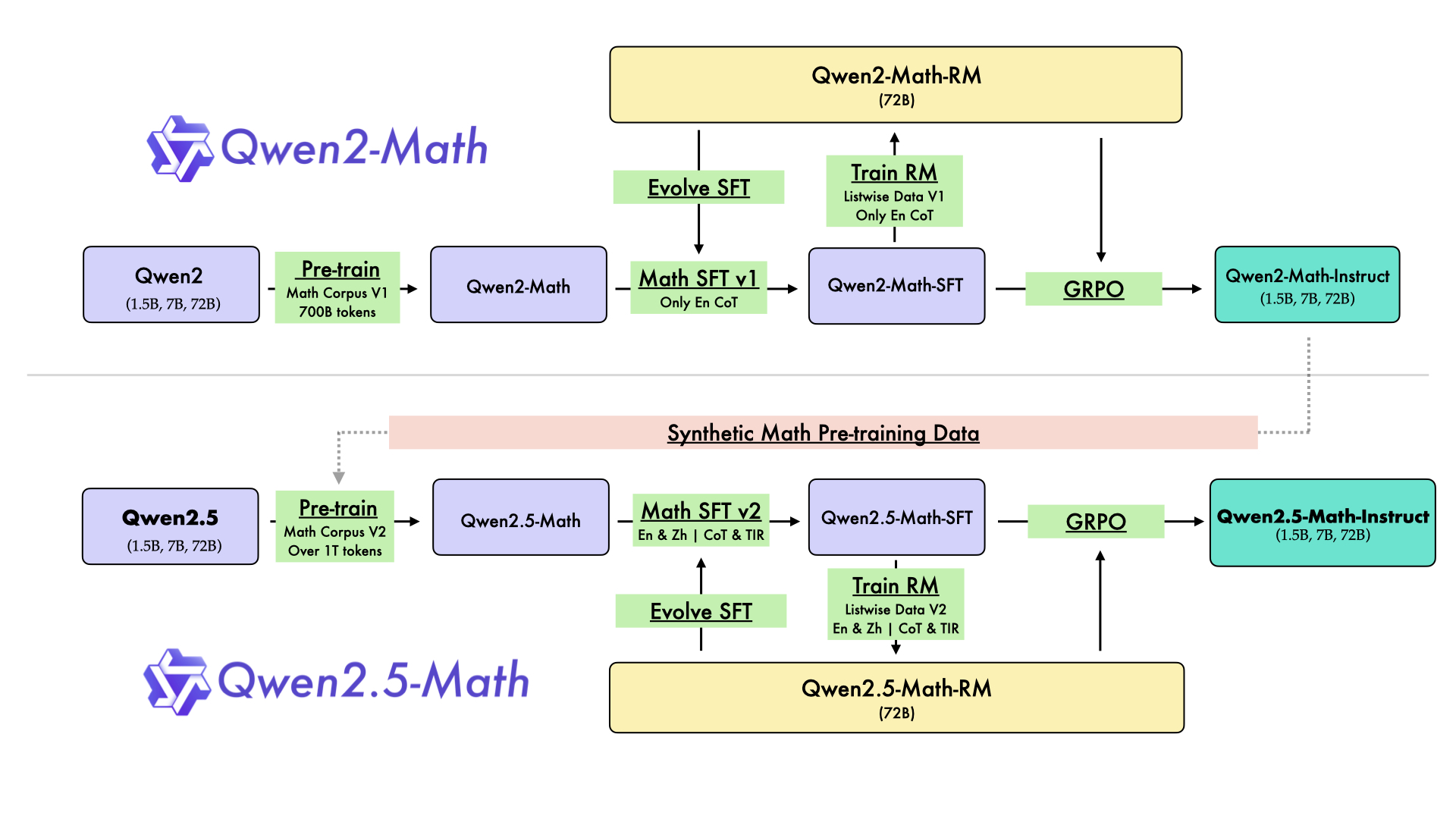
In August 2024, we released the first series of mathematical LLMs - Qwen2-Math - of our Qwen family. A month later, we have upgraded it and open-sourced Qwen2.5-Math series, including base models Qwen2.5-Math-1.5B/7B/72B, instruction-tuned models Qwen2.5-Math-1.5B/7B/72B-Instruct, and mathematical reward model Qwen2.5-Math-RM-72B.
Unlike Qwen2-Math series which only supports using Chain-of-Thught (CoT) to solve English math problems, Qwen2.5-Math series is expanded to support using both CoT and Tool-integrated Reasoning (TIR) to solve math problems in both Chinese and English. The Qwen2.5-Math series models have achieved significant performance improvements compared to the Qwen2-Math series models on the Chinese and English mathematics benchmarks with CoT.
While CoT plays a vital role in enhancing the reasoning capabilities of LLMs, it faces challenges in achieving computational accuracy and handling complex mathematical or algorithmic reasoning tasks, such as finding the roots of a quadratic equation or computing the eigenvalues of a matrix. TIR can further improve the model's proficiency in precise computation, symbolic manipulation, and algorithmic manipulation. Qwen2.5-Math-1.5B/7B/72B-Instruct achieve 79.7, 85.3, and 87.8 respectively on the MATH benchmark using TIR.
Model Details
For more details, please refer to our blog post and GitHub repo.
- Downloads last month
- 5
4-bit
8-bit